Concept
The project concept is to investigate how a neural network can memorize the image of a specific character and reproduce it in completely new contexts.
For training, I chose my cat, Eva, because she is a familiar image—her appearance is something I know well and can judge how accurately the model retains her characteristics.
I compiled a dataset of Eva’s photographs and trained my own LoRA model on it. After training, Eva is placed in scenarios not present in the original photos: in a garden, in the snow, in a new interior, and in other spaces.
Thus, the project demonstrates the transition from a real image to its digital interpretation and explores the extent to which a neural network is capable of preserving the recognizability of a specific character.
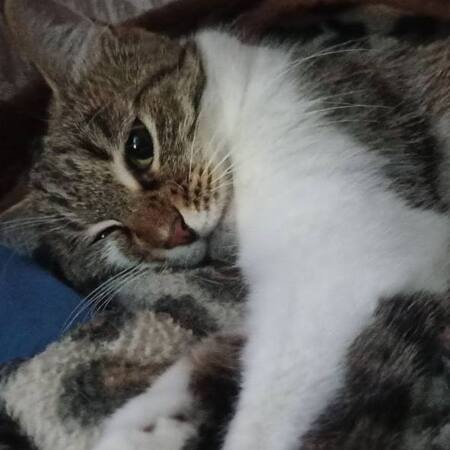
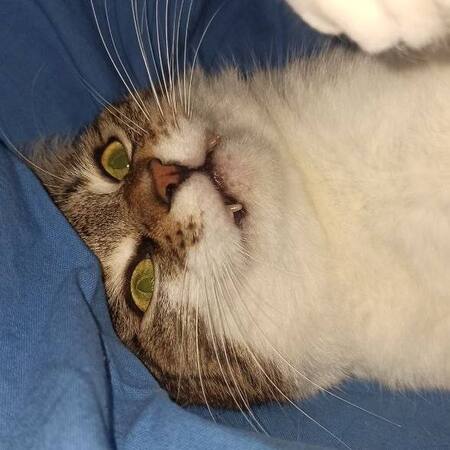
Examples of source images. Eve is my favorite cat. She is that very being with the consciousness and intellect of a human.
Project Concept
The project idea is to create a digital version of Eve, which allows for generating new photographs without actual shooting. By utilizing a small collection of existing images, I am creating a tool that enables placing her in any imagined situation or location—from a home interior to a winter forest.
Source files for learning
The dataset contains a total of 20 photos, all in a 1:1 square format. The shots were taken in different settings, but all were at home. I tried to select photos where Eva wasn’t in a standard, relaxed pose, but rather where she was playing or sleeping in an unusual posture, to make the project and the final outcome engaging.
// Phased project development
// PHASE ONE
Installation of necessary elements
CELL 1. GPU Check
! nvidia-smi
We are checking the connection of the graphics card that will be used to train the model.
CELL 2. Installing Core Libraries
! pip install bitsandbytes transformers accelerate peft datasets -q
We are installing the libraries necessary for running and training the LoRA model.
CELL 3. Installing Diffusers
We are installing the diffusers library from GitHub. It is required for working with Stable Diffusion models.
CELL 4. Updating TorchAO
We are installing/updating torchao, which is necessary for the correct operation of the environment and computation optimization.
CELL 5. Downloading the Training Script
We are downloading the ready-made script train_dreambooth_lora_sdxl.py, which we will use to train LoRA based on SDXL.
// SECOND PHASE
preparing your own dataset
CELL 6. Creating the Dataset Folder
We will create the my_cat folder, which will store Eva’s source photographs.
CELL 7. Uploading the Photos
We upload Eva’s own photographs into the created folder.
CELL 8. Viewing the Dataset
We display the uploaded photographs as a grid to check the dataset before further work.
// THIRD STAGE
photo preparation for training
CELL 9. Connecting BLIP
We are loading the BLIP Image Captioning model, which can automatically describe the content of photographs.
CELL 10. Generating Descriptions
BLIP analyzes Eva’s photographs and automatically creates a text description for each image.
CELL 11. Adding the EVACAT Token
We add the unique token EVACAT to the descriptions. This token is used as a special marker specifically for Eva during training.
CELL 12. Creating metadata.jsonl
We save the photograph names and their text descriptions into the metadata.jsonl file, which is subsequently used for training.
// FOURTH STAGE
LoRA model training
CELL 13. Configuring Training Parameters
We specify the base SDXL model, the dataset folder, image resolution, number of steps, and other parameters.
CELL 14. Initiating Training
We start DreamBooth LoRA training. Stable Diffusion XL 1.0 is used as the base, which we fine-tune using photos of Eva.
CELL 15. Training Over 500 Steps
The model gradually learns to associate the token EVACAT with Eva’s appearance. Intermediate checkpoints are created during training.
CELL 16. Saving the Result
We obtain the pytorch_lora_weights.safetensors file—these are the trained weights for our LoRA.
// PHASE FIVE
model preservation
CELL 17. Authentication on Hugging Face
Log in to your Hugging Face account to save your trained model.
CELL 18. Repository Creation
We create a separate repository for our LoRA model.
CELL 19. Model Upload
We upload the resulting eva_cat_LoRA weights to Hugging Face.
// SIXTH STAGE
connecting the trained model
CELL 20. Loading SDXL
We are reloading the base Stable Diffusion XL model.
CELL 21. Connecting Eva’s LoRA
We connect the trained weights eva_cat_LoRA to SDXL.
CELL 22. Configuring LoRA Strength
We set lora_scale = 0.5 to control the influence of the trained LoRA on the result.
// SEVENTH STAGE
generation of new images
CELL 23. Creating the first prompt
We write a prompt using the EVACAT token and define a new environment for Eva.
CELL 24. Image Generation
The model creates an image of Eva in a new situation not present in the original dataset.
CELLS 25–26. Prompt Experiments
We change the environment description and generate Eva in various settings: in a garden, a winter forest, in bed, and other locations.
// main cells with codes
1. Cell with Code #12 — Creating EVACAT Descriptions and Tokens
import json
caption_prefix = «a photo of EVACAT cat, „
with open (f'{local_dir}metadata.jsonl', 'w') as outfile:
for img in imgs_and_paths:
caption = caption_prefix + caption_images (img[1]).split („\n“)[0]
entry = {
„file_name“: img[0].split („/“)[-1],
„prompt“: caption
}
json.dump (entry, outfile)
outfile.write ('\n')
2. Code Cell #18 — LoRA Training
! accelerate launch train_dreambooth_lora_sdxl.py
--pretrained_model_name_or_path="stabilityai/stable-diffusion-xl-base-1.0»
--pretrained_vae_model_name_or_path="madebyollin/sdxl-vae-fp16-fix»
--dataset_name="my_cat»
--output_dir="eva_cat_LoRA»
--caption_column="prompt»
--mixed_precision="fp16»
--instance_prompt="a photo of EVACAT cat»
--resolution=512
--train_batch_size=2
--gradient_accumulation_steps=3
--gradient_checkpointing
--learning_rate=1e-4
--snr_gamma=5.0
--lr_scheduler="constant»
--lr_warmup_steps=0
--use_8bit_adam
--max_train_steps=500
--checkpointing_steps=250
--seed="0»
3. Cell with code #25 — connecting the trained LoRA
vae = AutoencoderKL.from_pretrained (
«madebyollin/sdxl-vae-fp16-fix»,
torch_dtype=torch.float16
)
pipe = DiffusionPipeline.from_pretrained (
«stabilityai/stable-diffusion-xl-base-1.0»,
vae=vae,
torch_dtype=torch.float16,
variant="fp16»,
use_safetensors=True
)
pipe.load_lora_weights («eva_cat_LoRA»)
pipe.fuse_lora (lora_scale=0.5)
_ = pipe.to («cuda»)
4. Cell with code #26 — final generation
prompt = «a photo of EVACAT cat, sitting in a green garden among flowers, looking at the camera, realistic photography»
image = pipe (
prompt=prompt,
num_inference_steps=25
).images[0]
image
// resulting images
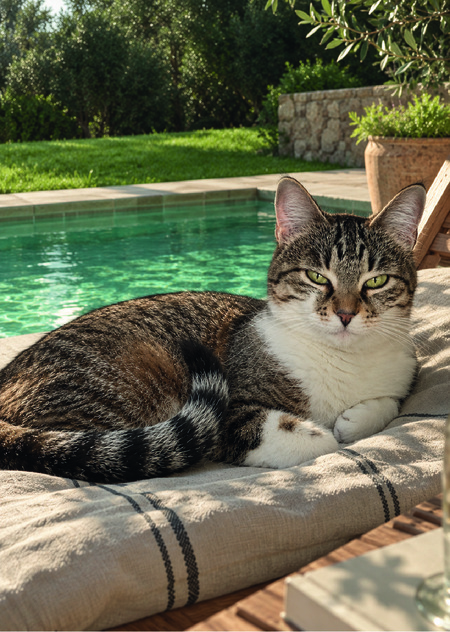
Final Image (1) Eva is lying on the bed
Final Image (2) Eve in the garden among the flowers